
Web Content Accessibility Guide
By April 26, 2027, all websites, website-based applications, and mobile applications must meet WCAG 2.1 or 2.2 level A/AA. To learn more about this important, shared responsibility, view our ADA Compliance Resources page. You can also learn how to measure and improve your overall compliance with this guide to Siteimprove.
The standards below are meant to provide College of Liberal Arts and Sciences website content editors and administrators with specific and important examples of what is, and is not, accessible web content. This is not a comprehensive list of the accessibility requirements as outlined by section 508 of the federal Workforce Rehabilitation Act.
Overall, your goal with your content is to keep it organized and easy for visitors to scan visually and navigate using a keyboard or other assistive technology. Accessible content is also valuable for your website’s Search Engine Optimization (SEO).
Web Accessible content…
- uses a logical heading structure
- splits larger chunks of information into smaller ones
- includes alt text with all images
- limits the use of ALL CAPS
- ensures text links make sense on their own
- captions all videos and post transcripts for all audio files
- labels form fields correctly
- only uses ACCESSIBLE PDF and Microsoft Office files if the content cannot be included as a webpage
- does not rely on text on an image to convey information
Web accessible content uses a logical heading structure.
Not Accessible

The page content above is in one big block of text and formatted with Heading 3. With all of the text formatted as Heading 3, this could interrupt how to some visitors with screen reading technology access the information, and it can also cause problems for your search engine results.
Accessible
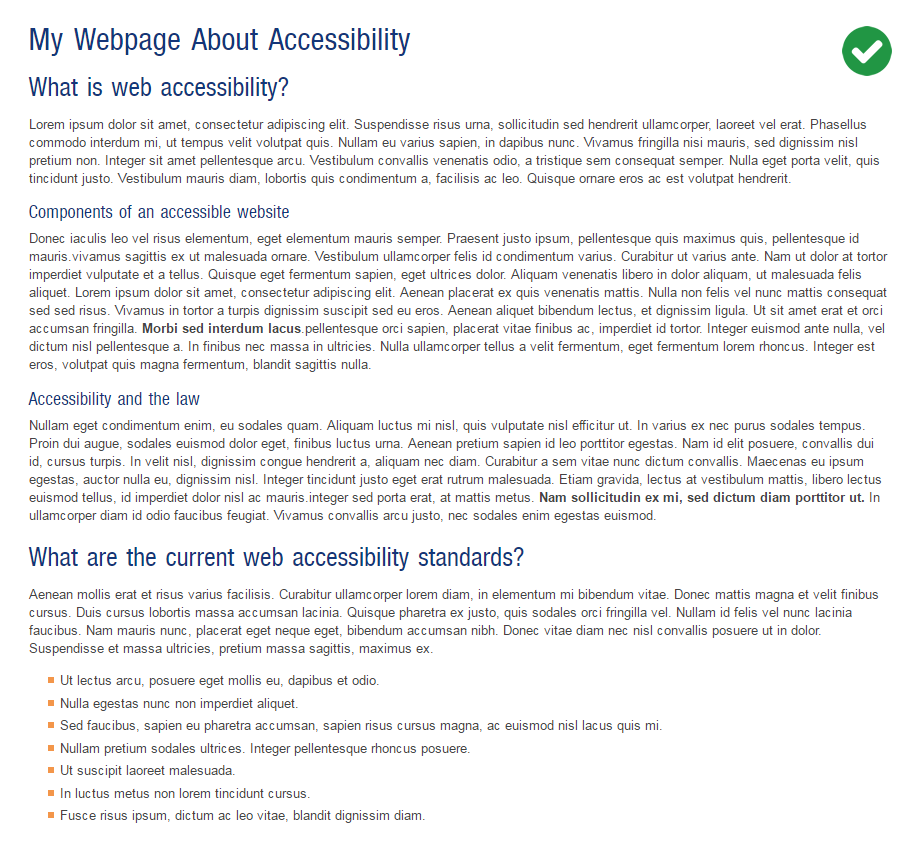
Using headings in a proper manner (to denote the flow of content) gives us a page of content that is easier to read for all users, and will not interfere with screen reading technologies. The content on this page was reorganized with a logical structure of headings and subheadings. The content was broken up in a way that is easier for users to scan through to find the information they are looking for quickly.
Web accessible content splits larger chunks of information into smaller ones.
Not Accessible

This large block of text is hard to read and may even cause site visitors without visual imparments to skip the content.
Accessible

The content was reorganized and reduced to only the most critical information. A bulleted list was created to add a little more emphasis to each list item.
Web accessible content includes Alt Text with all images.
Tip: If your image contains text, such as words on a sign, it’s best to include the text from the image within the Alternative Text so it’s possible for the website visitor to access that information.
Not Accessible

Without alt text a visitor using a screen reader will not know what the image was depicting on the webpage.
Accessible

Describe the image including any important text in the image such as an event name and date.
Web accessible content limits the use of ALL CAPS.
Not Accessible

Using all caps in your writing can make it hard to read not only for those with visual impairments but cognitive impairments as well. This text, while nicely organized, is not accessible.
Accessible

The content is written using normal sentence casing which is much easier for the user to read either with or without assistive technologies.
Web accessible content ensures text links make sense on their own.
Not Accessible

The “Read More” link is not descriptive and does not convey what the link is for if separated from the content.
Accessible

Instead, using links with descriptive text, and separated from the content just slightly can be very helpful to all site visitors.
Web accessible content captions all videos and post transcripts for all audio files.
Not Accessible

Without captions, videos are inaccessible for people that may be deaf, hard of hearing, or not native English speakers. Many viewers without disabilities prefer to read captions to help them better understand the information they may miss in the video due to the audio quality, or the noise levels in the area they are watching the video in.
Accessible

Adding captions to the video is not only helpful to deaf viewers, but others that are hard of hearing. You might also want to include a link to a video transcript for visitors to read along with the video.
Captions and Live Transcription in Zoom
This feature is available to every licensed UF Zoom user.
Web accessible content labels form fields correctly.
Not Accessible

These form fields are not labelled and would be confusing to any site visitor.
Accessible

Fortunately, our Gravity Forms plugin takes care of this accessibility of your forms for you. As you rename the fields of your forms, Gravity Forms also labels them with the same name so that users with assistive technologies will still be able to complete the form.
Web accessible content only uses ACCESSIBLE PDF and Microsoft Office files if the content cannot be included as a webpage.
First ask yourself, “does this content need to be in a PDF or Microsoft Office file instead of a webpage?” Web pages should be your “go-to” method of adding content to your site. PDFs and other downloadable files should only be used if no other option is available. If a PDF or Microsoft Office file is the only means to post your content, you must make sure they are accessible. There are many tutorials online that can teach you about creating accessible PDFs and Office files.
- Create and verify PDF accessibility (article) by Adobe
- Make your Word documents accessible (article) by Microsoft Support
- Creating Accessible Word Documents (video) by UF CITT
- Accessibility Video Training Library (section508.gov) by US General Services Administration
Web accessible content does not rely on text on an image to convey information
Important information for your visitors such as text, links, and data should be included in a webpage as part of the content and not as an image screenshot. Text on images does not allow many users to be able to access that information if they are using a screen reader. It may also prevent visitors on smaller devices from being able to read the text even if they do not have a visual impairment. If text on an image is used, it’s best to make that same information available on the page in some way. For example, if you are adding a graphic for an event with information on the date and location, that same information should be added to the page and close to the image, ideally.
Not Accessible

Accessible
